EMT Practice Test

1. Question Content...


Question List

Question1: User A schedules a report in Report Center Scheduler.
What can user A achieve by enabling the Job Completion notification option for a scheduled job in the
Report Center Scheduler?

Question2: When you create a table report, in which step can you include inactive users?

Question3: When constructing an expression for a calculated column, which syntax should you use to enter a date?

Question4: In a canvas report, to which of the following can you export multipage reports in a single transaction?
Note: There are 3 correct answers to this question.

Question5: The data source used by the two tables only displays current (active) employees.
How would you configure a filter on the table End of Previous Year Headcount by Location to display
data accurately?

Note: There are 2 correct answers to this question.

Question6: Which tool can you use to upload a report from the test instance to the production instance?
Note: There are 2 correct answers to this question.

Question7: In a live data query, what are user-prompted filter types?
Note: There are 2 correct answers to this question.

Question8: You want to create a query that shows only the current Job Information data for each employee.
On the Job Information table, which date type configurations can you use?
Note: There are 2 correct answers to this question.

Question9: A user wants to build a pivot chart based on a list report that has a run-time filter.
What must the user do?

Question10: If you want to create a single filter that utilizes criteria from multiple tables in the same query, which
filter do you need to use?

Question11: When a user builds a query, what is the default People Scope of the query?
Question12: Which actions can you perform in a Simple Text component?
Note: There are 3 correct answers to this question.

Question13: User A maintains a canvas report of employee contact information. User A leaves the company. Another
report designer, user B, is assigned the responsibility to maintain the report, but
currently CANNOT modify the report.
How do you allow user B to modify only this report?

Question14: You want to create a report that returns only employees who were born in 1961. You also want to
enable the person who runs the report to specify a different birth year.
How can you achieve this?
Note: There are 2 correct answers to this question.

Question15: You are trying to create a conditional expression to relabel a field. You create the following expression:
IF( (UserflBasic User lnformation#Gender] = "M", "Male": "Female ")
You received an error message saying the formula could NOT be computed.
Which symbol in your expression is causing the error?

Question16: You want to return the quarter to date event records to count terminations.
Which options would you set in the time filter?
Note: There are 3 correct answers to this question.

Question17: In the Advanced Reporting tool, you want to create a query where the results meet the following criteria
* Only show one row per employee,
* Only show the pay components Base Salary and Bonus,
* Show these pay components as individual columns.
You have joined the Global Job Information table with the Compensation table.What else must you do?

Note: There are 2 correct answers to this question.

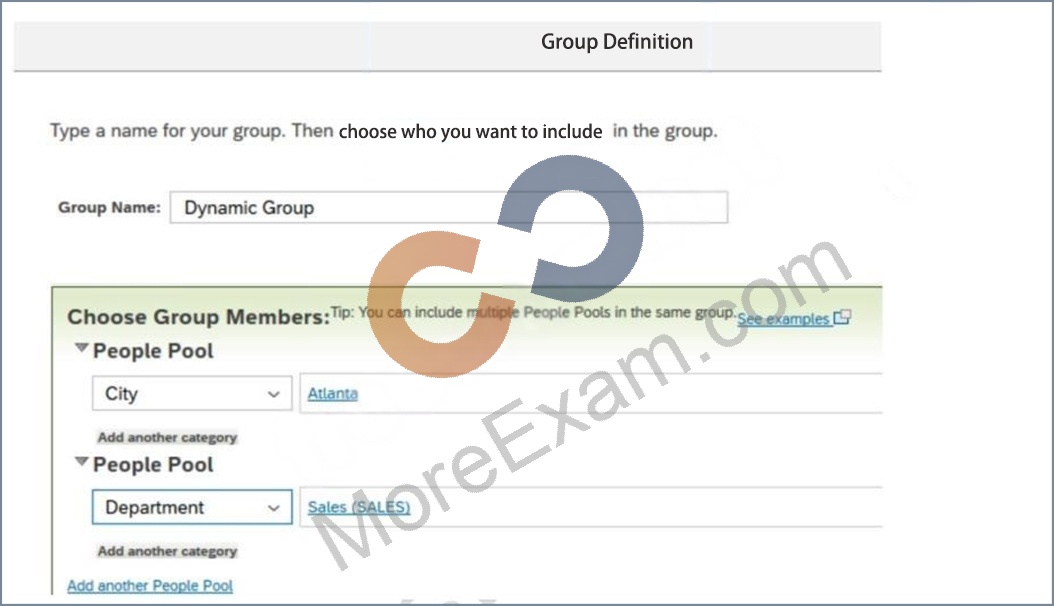
Question18: You are using Report Center to share a canvas report. You share the report with a Dynamic Group (see
attached image).

Who is the report shared with?

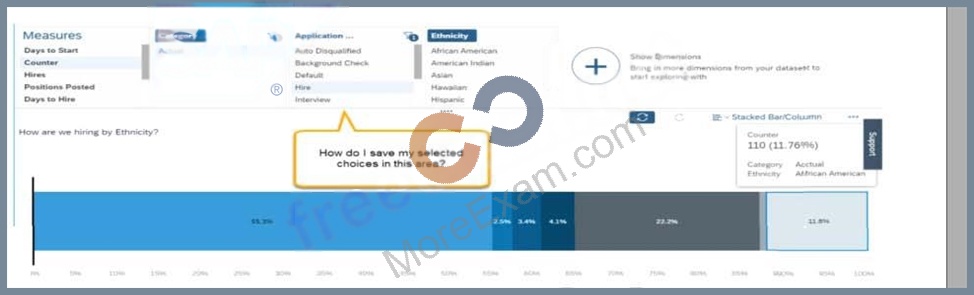
Question19: You support report consumers. A report consumer asks if it is possible to save the selected items when
viewing the detail of a chart in a story report (see screenshot).

How do you tell the report consumer to save the state?
Note: There are 2 correct answers to this question.

Question20: What setting in Provisioning enables Live data source?

Question21: How do you configure the Builder to display the table in the screenshot in a story report? Note: There
are 3 correct answers to this question. Headcount by Location

Question22: While constructing a dashboard, you find that you need to create a tile that requires more complex
configuration than what is available with the Online Tile Builder tool.
What tool can you use to create this tile?

Question23: Why would you export report definitions?
Note: There are 2 correct answers to this question.

Question24: You have created a custom MDF object to track company car information. You need to be able to create
story reports on the data of the custom MDF object.
What must you do to enable a custom MDF object to be listed in the Available Data section of Query
Designer?

Question25: You transferred a report to another instance.
Where can you start the validation of this report?
Note: There are 2 correct answers to this question.

Question26: When using Report Center, what permissions are required to create a canvas report on Employee Profile
data using the Detailed Reporting tool?
Note: There are 3 correct answers to this question.

Question27: How can you give users permissions to see a tile?

Question28: Which fields can you format using Column Formatting on the Edit menu?
Note: There are 2 correct answers to this question.

Question29: A report shows one row for each language an employee speaks. The employee information "First name"
and "Last name" is repeated for each language on each row.
Which format option allows you to display the employee information "First name" and "Last name" only
once for each employee?

Question30: User A creates a dashboard with four tiles. When User B accesses the dashboard, only three tiles are
visible.
Why can User B see only three tiles?

Question31: When you use a column of type text as a measure in a pivot query, which of the following pivot
functions are available?
Note: There are 2 correct answers to this question.

Question32: You are creating a Story report on Job Classifications. You have configured the chart, table, and input
control on the canvas as displayed in the screenshot.

How do you set the input control?

Question33: You are creating a calculated column to calculate an employee's organizational tenure.

Why does the formula in the screenshot result in an error?

Question34: You are configuring a story report. You add the image widget to the top-left corner of the canvas. You
then upload the SuccessFactors logo in the Builder and select the logo image so it
displays on the canvas. When you preview the report in View Mode, the logo appears centered on the
canvas.
What action do you take so the Logo appears in the top-left corner when viewing the report in view
mode?

Question35: You are creating a query that lists employee information such as name, address, and dependent
information. The query uses Personal Information as the driving table and joins the Dependents and
Address tables. You notice many employees are missing from the result set.

What are the reasons?

Question36: You want to join two tables, A and B, and you want to include all rows from Table A, and only matching
rows from Table B. Which join type must you use?

Question37: A report consumer claims that a canvas report shared with them is NO longer available in Report Center.
Upon your investigation, you find the report has been deleted. You need to
reproduce the report as quickly as possible.
What action do you take?

Question38: What is the purpose of the Include Starting From User setting in People Scope?

Question39: Which are valid destinations of a scheduled Report Distributor bundle?

Note: There are 3 correct answers to this question.