QuizUN
1. Question Content...
EXPLANATION
Answer: X - EXPLANATION Content.
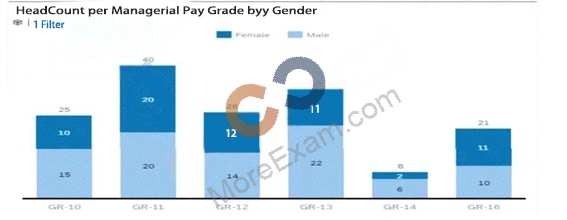
Question1: How do you configure the Builder to display the chart in the screenshot in a story report?Note: There are 3 correct answers to this question.
Question2: What functionality can be used in a calculated column? Note: There are 2 correct answers to this question.
Question3: You are creating a query for a historical compensation story report in Query Designer. You have added the Job Information table to the query, configured a scope filter, and previewed the result to verify you are returning theappropriate employees.You add the related table Compensation to the query.When you preview the query, you only get the current compensation information for the employees.Why do you only receive the current records?Note: There are 2 correct answersto this question.
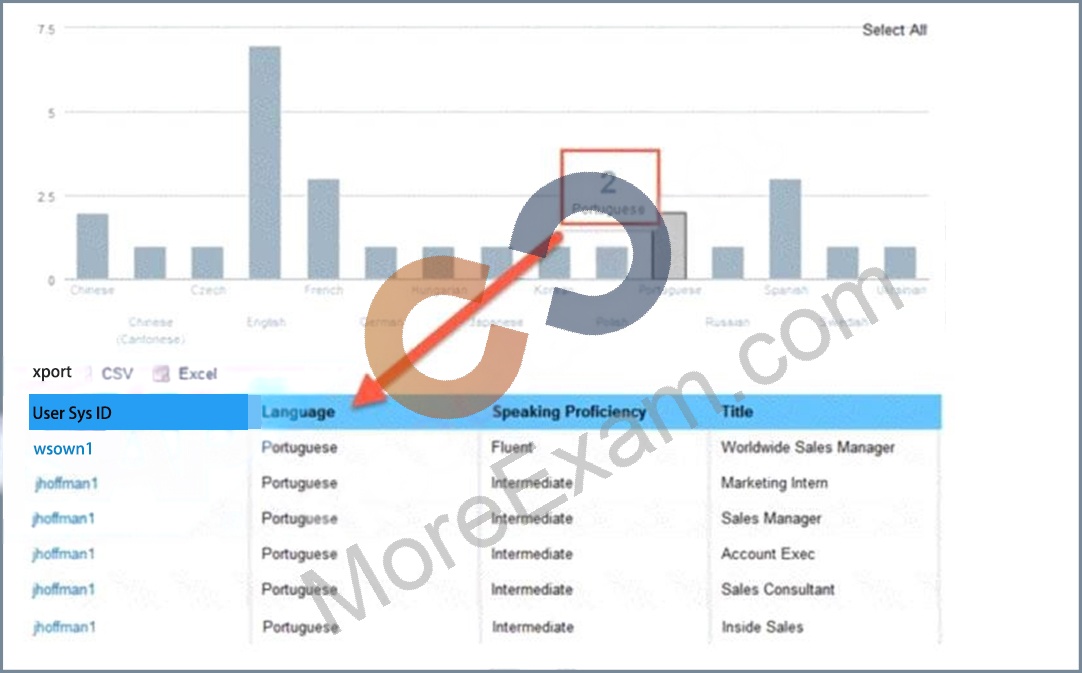
Question4: The drill-down list of a tile contains more entries than the values displayed in a chart (see attached image).How do you make the outputs match?
Question5: User A schedules a report in Report Center Scheduler.What can user A achieve by enabling the Job Completion notification option for a scheduled job in the Report Center Scheduler?
Question6: In the Advanced Reporting tool, you want to create a query that includes the employee's matrix manager.When you configure the table join with the Job Relationships table, the Results tab displays multiple rows per employee that also include relationships to HR managers and second managers.How do you configure the query to return one row per employee that shows the employee's matrix manager when assigned?
Question7: You are using a pivot table in your canvas report but the report does NOT display the most recent data.Whatcould be the reason?
Question8: You create a report page and want to change the grid column width and grid row height. Wherecan you do this?
Question9: Which actions can you permit the report consumer to perform by your configuration of Interactive widgets?Note: There are 3 correct answers to this question.
Question10: What setting in Provisioning enables Live data source?
Question11: User A maintains a canvas report of employee contact information. User A leaves the company. Another report designer, user B, is assigned the responsibility to maintain the report, but currently CANNOT modify the report.How do you allow user B to modify only this report?
Question12: How do you give an analyst permission to build tiles?
Question13: Which permissions should you assign to allow a user to add a new story that will include Career Development Planning data?Note: There are 2 correct answers to this question.
Question14: When you share a tile, how can the user view that tile?Note: There are 3correct answers to this question.
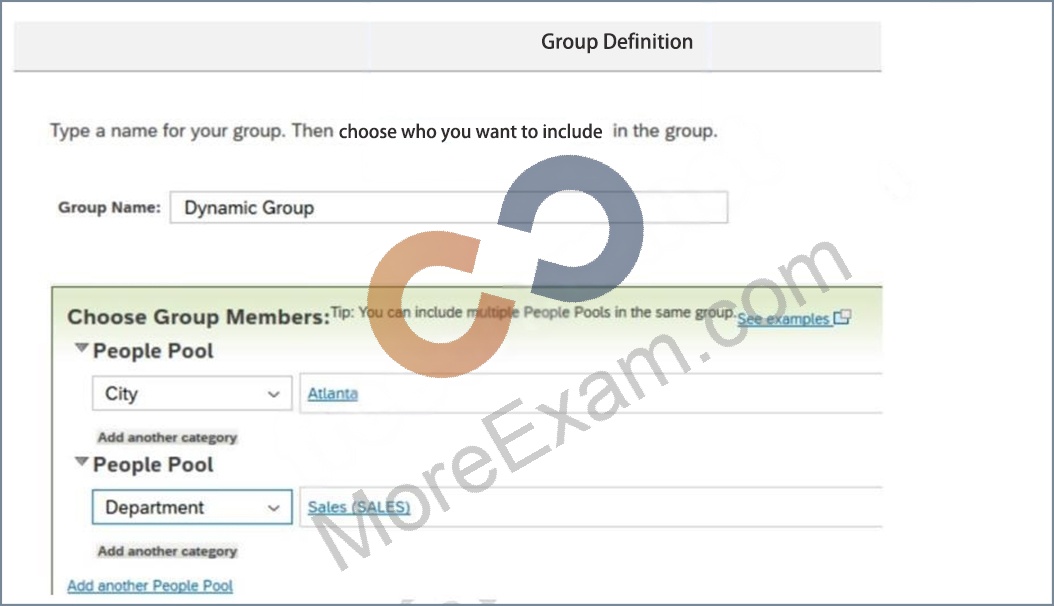
Question15: You are using Report Center to share a canvas report. You share the report with a Dynamic Group (see attached image).Who is the report shared with?
Question16: Youwant to build a query for a cross-domain report.What does the system do with fields that are NOT available for this report?
Question17: The drill-down list of a tile contains more entries than the values displayed in a chart (see attached image).How do you make the outputs match?
Question18: You want to create a page in a canvas report that includes a custom image, a user editable title centeredunderneath the image, and the current date in the top-right corner.Which combinations of components can you use to accomplish this?Note: There are 2 correct answers to this question.
Question19: When constructing an expression for a calculated column, which syntax should you use to enter a date?
Question20: In the Advanced Reporting tool, you want to create a query where the results meet the following criteria* Only show one row per employee,* Only show the pay components Base Salary and Bonus,* Show these pay components as individual columns.You have joined the Global Job Information table with the Compensation table.What else must you do?Note: There are 2 correct answers to this question.
Question21: You are creating a query that lists employee information such as name, address, and dependent information.The query uses Personal Information as the driving table and joins theDependents and Addresstables. You notice many employees are missing from the result set.What are the reasons?
Question22: You want to create a query that includes information about an employee's current job, as well as information such as name and date of birth.How do you do this?Note:There are 2 correct answers to this question.
Question23: What provisioning setting must you enable to allow customers to upload a custom BIRT template to a Table Report?
Question24: Where can you obtain the latest versions of the standard report templates provided by SAP Success Factors?
Question25: When you create a table report, in which step can you include inactive users?
Question26: Which fields can you format using Column Formatting on the Edit menu?Note: There are 2 correct answers to thisquestion.
Question27: What permission type applied to table reports is defined by a combination of the user's View permissions and Target Population in role-based permissions?
Question28: You are configuring a story report. You add the image widget to the top-left corner of the canvas. You then upload the SuccessFactors logo in the Builder and select the logo image so it displays on the canvas. When you preview the report in View Mode, the logo appears centered on the canvas.What action do you take so the Logo appears in the top-left corner when viewing the report in view mode?
Question29: Why would you export report definitions?Note: There are 2 correct answers to this question.
Question30: How do you configure the Builder to display the chart in the screenshot in a story report?Note: There are 3 correct answers to this question.
Question31: You are trying to create a conditionalexpression to relabel a field. You create the following expression:IF( (UserflBasic User lnformation#Gender] = "M", "Male": "Female ")You received an error message saying the formula could NOT be computed.Which symbol in your expression is causing the error?
Question32: Why is it important to consider the People step of the report definition when you share a table report with another user?
Question33: You are configuring a story report. You add the image widget to the top-left corner of the canvas. You then upload the SuccessFactors logo in the Builder and select the logo image so it displays on the canvas. When you preview the report in View Mode, the logo appears centered on the canvas.What action do you take so the Logo appears in the top-left corner when viewing the report in view mode?
Question34: You are building a performance report. In reviewing the Performance Management schema, you notice that the2019 Performance Review Table is listed in the Available Data section. You begin the query by adding the Basic User Information tablefrom the User schema. You notice that the 2019 Performance Review Table is NO longer listed in the Available Data section.Why is the 2019 Performance Review table NOT in the list?